The accession register keeps track of how the archives arrived: gift, deposit, purchase, bequest, transfer. It is optional (you don’t need it to describe your own archives), but valuable as soon as you receive records from someone else. Accessions feed ISAD(G) element 3.2.4, Immediate source of acquisition or transfer, of the units that came with them.
The Accessions destination
Click Accessions in the sidebar (⌘4). The center column lists the accessions, most recent first, with their number, method, date, source, status and number of linked units.
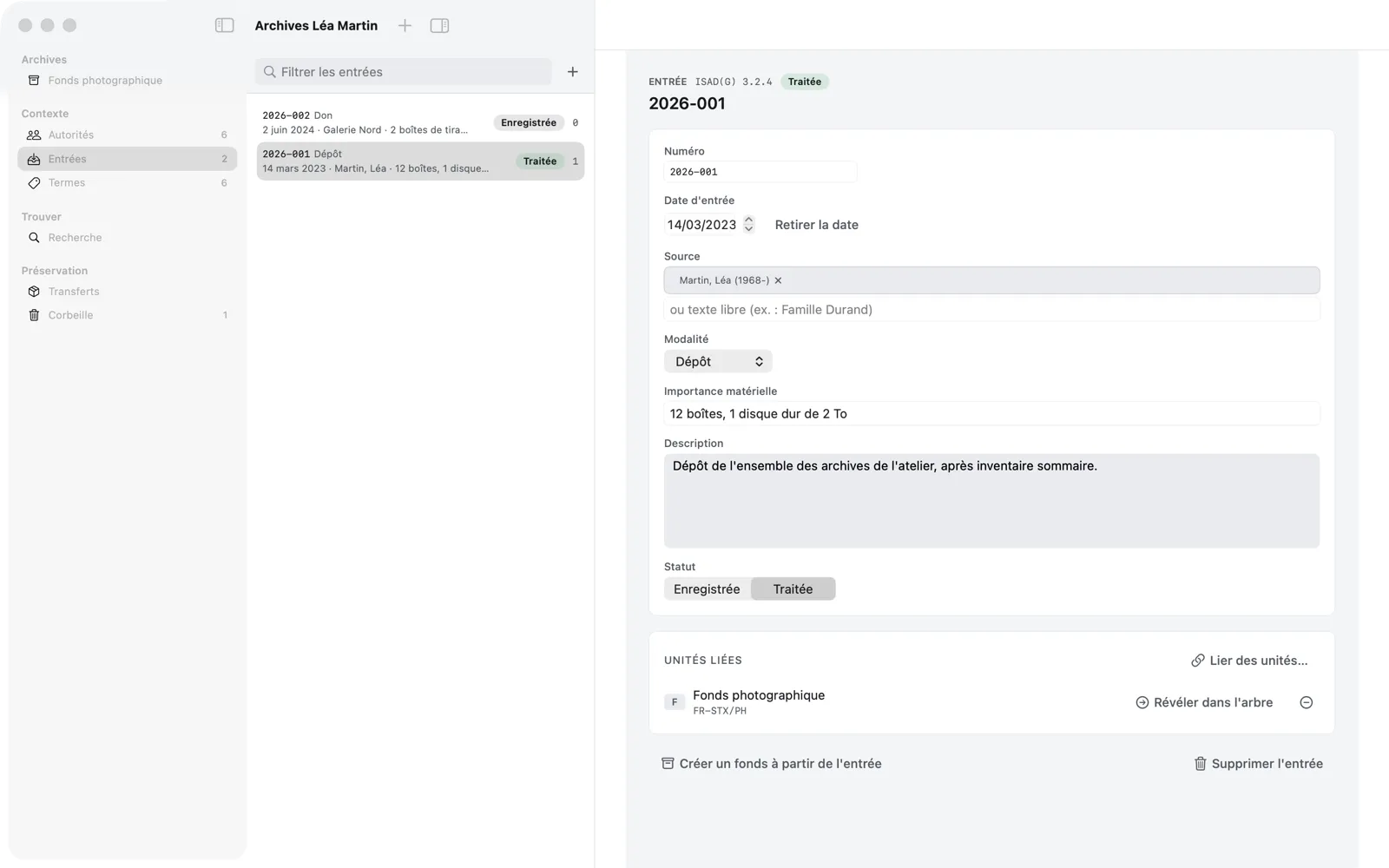
Recording an accession
- Click + at the top of the list (New Accession, ⌘N when the destination is showing).
- Fill in the record, which is saved automatically:
- Number: suggested in the YYYY-NNN format (for example
2026-001), editable, unique in the register; - Accession date (Add a Date, Remove Date);
- Source: an authority record (person, family, corporate body), chosen or created just like a creator, or free text (“Durand family, through…”);
- Method: Gift, Deposit, Purchase, Bequest, Transfer or Other;
- Extent: free text, for example “12 boxes, 1 hard drive of 2 TB”;
- Description;
- Status: Registered on arrival, Processed once the archives have been arranged and described.
- Number: suggested in the YYYY-NNN format (for example
For Léa’s fonds, accession 2026-001 records the deposit of March 14, 2023, source “Martin, Léa”, method Deposit.
Linking an accession to units
In the record’s Linked units card, Link Units… opens a sheet where you search for units by title or reference code, then click Link. Léa links the “Fonds photographique” there.
A linked accession then appears as context for element 3.2.4 (Immediate source of acquisition or transfer) in the description, in Complete mode, of the linked unit and all its descendants; the Open the accession in the register link takes you back to it. Reveal in Tree goes the other way, and the − button unlinks a unit.
Creating a fonds from an accession
When an accession corresponds to a new body of records, Create a Fonds from the Accession, at the bottom of the record, creates in one go:
- a new fonds linked to the accession;
- with the accession’s source as its creator, if the source is an authority record;
- and element 3.2.4 pre-filled (method, date, source).
All that’s left is to give it a title and build its tree.
Delete Accession removes the accession from the register (you can undo with ⌘Z).