Select a unit in the tree: its description appears on the right. There is no Save button: everything you enter is saved automatically half a second after your last keystroke, and can be undone with ⌘Z.
The header shows the unit’s level, reference code and status (“Draft,” “Arranging,” “Described,” “Validated,” “Ready for preservation,” “Transferred”), then its title.
Two views: Essential and Complete
The picker at the top right switches between two views of the same description (View › Toggle Essential / Complete, ⌘E):
- Essential shows the six essential elements of ISAD(G), plus scope and content, access points and digital objects. This is the view for everyday work.
- Complete shows the seven areas of ISAD(G), with all their elements.
The choice applies to the window. The view of a new window is set in Settings › General › Default description mode.
The Essential view
Léa describes the “Negatives” file of Project A:
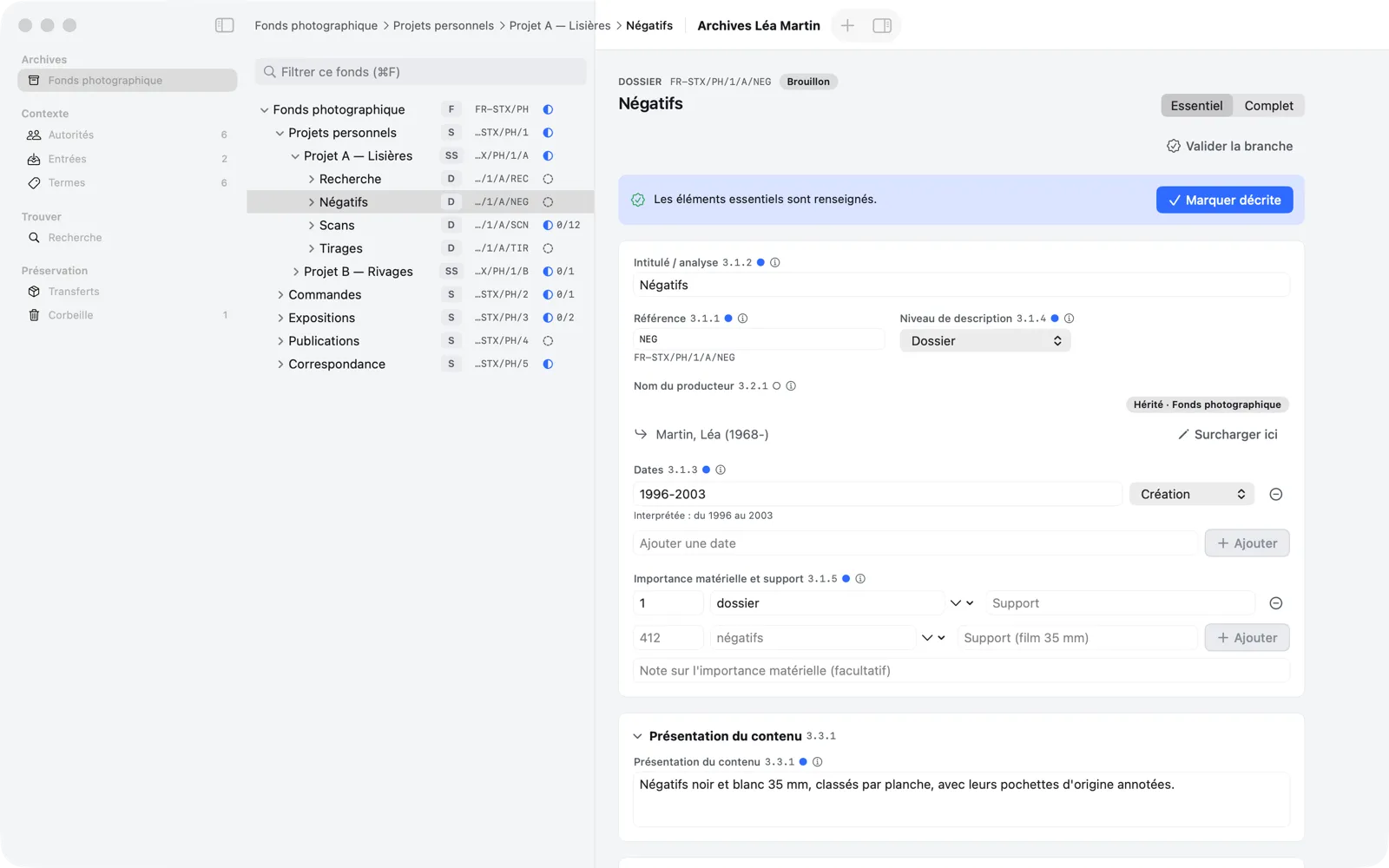
The main card brings together:
- Title (3.1.2);
- Reference code(s) (3.1.1): the unit’s own segment, with the full reference code below it;
- Level of description (3.1.4);
- Name of creator(s) (3.2.1): here inherited from the fonds, see Inheritance and Authorities;
- Date(s) (3.1.3);
- Extent and medium of the unit of description (3.1.5).
Next come Scope and content (3.3.1), which can be collapsed, Access points and Digital objects.
Next to the name of each element:
- its ISAD(G) number (which you can hide in Settings › General › Show ISAD(G) element numbers on fields);
- a solid dot ● if the element is recommended at this level, a circle ○ if it is only possible there;
- the ⓘ button, which opens the element’s help: its Purpose, the entry Rule, an Example and, for elements passed down to descendants, a note on Inheritance. The help also gives the element’s name in the other language.
Enter dates
Type the date expression the way you would write it, then Add (or ↩). Memory Atlas parses it and shows below what it understood (“Interpreted: from 1996 to 2003”). Accepted examples: 1907-1949, [ca. 1995], 1923-1932, 1936-1945 (several ranges).
- The menu to the right of each date gives its Type: Creation, Accumulation or Other.
- The − button deletes a date.
- Undated explicitly declares the unit undated (n.d.). This is accepted, but flagged with a warning during validation.
- An expression Memory Atlas cannot parse is kept as typed, but it is not used for date filtering in search. An end date earlier than the start date is flagged.
Enter the extent
Each statement has three parts: a quantity in figures (412 or 1.5), a unit of measurement (negatives, boxes, file…; the menu offers the common units) and, optionally, the medium (35 mm film). Fill in the empty row at the bottom, then Add. For Project A, Léa enters “412 negatives, 35 mm film”; for the fonds, “12 boxes” and “1 hard drive, 2 TB.”
“Mark Described”
Above the card, a strip shows where the unit stands:
- as long as an essential element is missing, it lists what needs to be completed (“To mark described: add a date or ‘n.d.’ (3.1.3); give the extent (3.1.5)…”);
- when everything is there, it shows “The essential elements are filled in.” and the Mark Described button, which sets the unit’s status to “Described.”
The required elements are: a title other than “Untitled,” a level, a reference code segment, at least one date (or “n.d.”), consistent dates, at least one extent statement and at least one creator, local or inherited. For an item, a missing extent is only a “To check” point.
Marking a unit described is optional: validation checks the same rules across a whole branch anyway.
The Complete view
In Complete mode, the description is organized according to the seven areas of ISAD(G): identity statement, context, content and structure, conditions of access and use, allied materials, notes, description control. Each area is a collapsible card with its “n/N filled in” counter; empty areas are collapsed when the view opens.
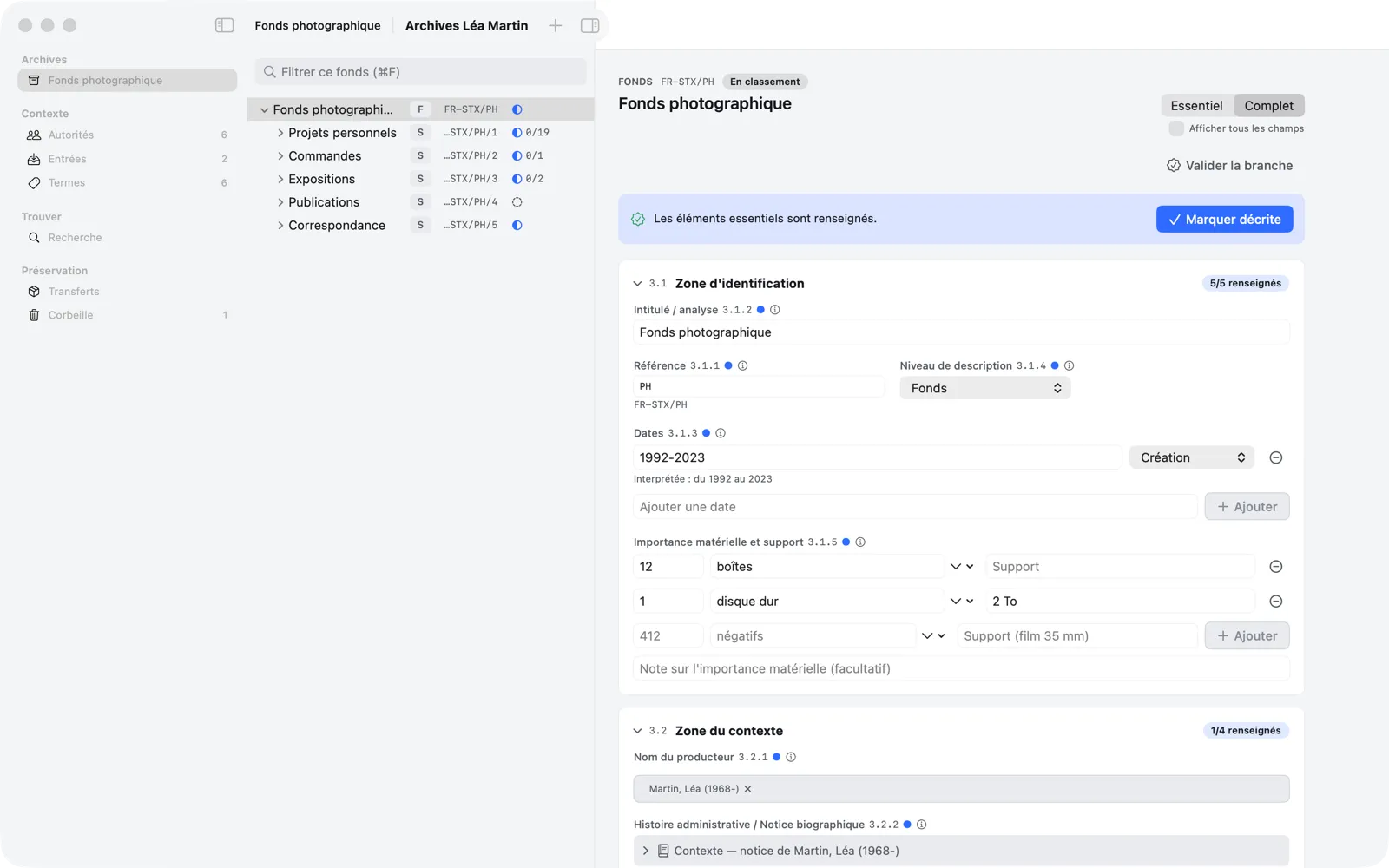
Elements of little relevance at the unit’s level are hidden, unless they are already filled in; a line at the bottom of the area says so (“2 fields of little relevance at this level hidden”). Check Show all fields, below the picker, to see them all.
A few elements have a dedicated editor:
- Conditions governing access (3.4.1): a Status (Open, Restricted, Closed, or Not specified (inherited)) and, for restricted or closed access, the Open for access from date (YYYY, YYYY-MM or YYYY-MM-DD);
- Language/scripts of material (3.4.3): ISO 639-2 language codes (
fre,eng…) and ISO 15924 script codes; - Note (3.6.1): a list of notes;
- Date(s) of descriptions (3.7.3): filled in automatically, at creation, then at each revision (one per day) and at each validation.
Access points, which are not an ISAD(G) element, follow the seven areas.